

- HackOnChat is a global scam, uncovered by security firm CTM360, that hijacks WhatsApp accounts using fake login pages.
- It works two ways: hijacking your WhatsApp Web session, or tricking you into handing over a verification code.
- The scam spreads through trust. Once an account is taken over, it messages that person’s contacts asking for money or codes.
- WhatsApp will never ask you to “verify” your account through a link. Real checks happen inside the app.
- Two-factor authentication and a habit of never sharing codes are your strongest protection.
WhatsApp is one of the most popular messaging apps in the world, and for good reason. It is quick, easy, and convenient for staying in touch with family, friends, and colleagues. But that popularity also makes it a target, and attackers are increasingly finding ways to exploit it.
Recently, the security firm CTM360 uncovered a global campaign, named HackOnChat, that tricks WhatsApp users into handing over access to their own accounts using fake web pages and clever social engineering. It has spread quickly, and more people are falling for it. The reassuring part is that once you understand how it works, it becomes much easier to avoid.
What is HackOnChat?
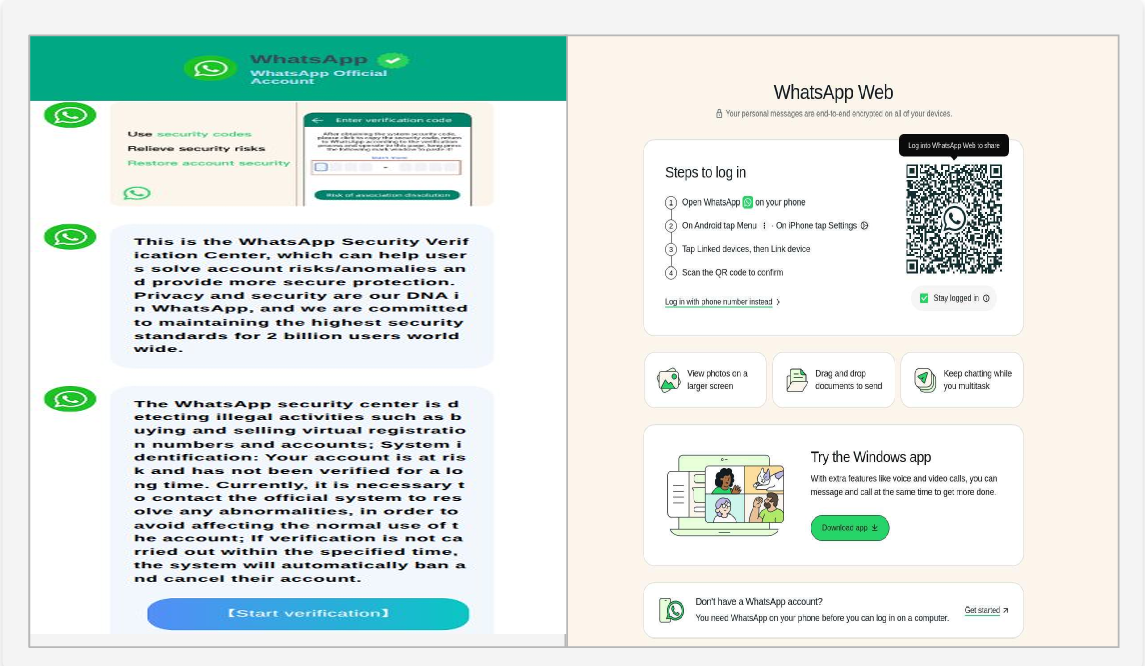
HackOnChat tricks WhatsApp users into giving up access to their accounts. It does this with fake WhatsApp Web login pages that look almost identical to the real thing. You might get a message, or what looks like a WhatsApp notification, saying your account needs to be “verified”, often with an official-looking link and a fake security warning. Click it, and you land on a convincing fake page built to steal your login or hijack your session.
According to CTM360, the campaign relies on two main techniques:
- Session hijacking. Attackers abuse WhatsApp’s “linked devices” feature to attach their own device to your account, giving them access to your chats without needing your password.
- Account takeover. You are tricked into sharing a verification code, which hands the attacker full control of your account.
Once they are in, they can message your contacts asking for money or personal details, spread the scam further, or dig through your chats, photos, and documents.
How the scam unfolds
The pattern is consistent, and recognising it is half the battle:
- A fake alert. You receive an alarming notice about “suspicious activity” or a demand to “verify” your account. It is built to create urgency.
- An impersonation page. The link leads to a page that looks just like WhatsApp Web, asking for your details or a security code.
- The takeover. With that information, the attacker links their device or seizes your account.
- The spread. Using your name and your trust with others, they send the same scam to your contacts, and the cycle repeats.
Why it is so effective
WhatsApp is built on trust. We use it to talk to people we know, so when a message appears to come from a friend, most of us do not think twice before clicking. HackOnChat exploits exactly that instinct. By copying familiar screens and wording, it slips past the caution we would apply to an obvious stranger, which is what makes it so effective, especially for people who are not used to spotting phishing.
WhatsApp will never ask you to “verify” your account by clicking a link, and no legitimate service needs your one-time verification code. Anyone asking for that code, even a friend, is either compromised or an attacker. Never share it.
How to protect yourself
Staying safe comes down to a few steady habits:
- Check the address before you log in. The only real WhatsApp Web address is
web.whatsapp.com. If a page asking you to log in shows anything else, or a misspelled version, close it. - Do not click “verify” links. Even if a link looks official, treat account-verification requests as suspicious. If a message comes from a friend, confirm with them directly, ideally by calling, before acting.
- Turn on two-step verification. In WhatsApp, go to Settings, then Account, then Two-step verification, and switch it on. It adds a PIN that blocks attackers even if they get part-way in.
- Guard your codes. Never share a WhatsApp verification or registration code with anyone, for any reason.
- Stay informed. Scams evolve quickly. Knowing how the current ones work is one of the best defences you have.
Open WhatsApp and turn on two-step verification right now: Settings, then Account, then Two-step verification. While you are there, remind yourself of one rule that stops most of these scams on its own: never share a verification code, and never log in to WhatsApp Web anywhere except web.whatsapp.com.
Stay aware, stay secure
Cybersecurity does not have to be overwhelming. By staying aware and trusting your instincts, you can sidestep scams like HackOnChat with ease. When a message pressures you to act fast or click to “verify”, slow down. When in doubt, do not click, and check directly inside the app instead.