


A critical flaw in Forminator Forms, a WordPress form builder with more than 600,000 active installations, lets an unauthenticated attacker upload executable PHP files to a vulnerable site. Tracked as CVE-2026-15748 and rated 9.8 on the CVSS scale, it was fixed in version 1.56.2 on 31 July 2026. Roughly half of installations were still running an affected version when the flaw was disclosed publicly in mid-August.
What the flaw is
Forminator builds contact, payment, poll, quiz and file-upload forms. The vulnerability sits in the function that handles uploaded files, and it is a chain of small weaknesses rather than one mistake.
The plugin’s public submission handler trusts upload field configuration supplied in the request, which an attacker can forge through a manipulated Select field value. That gives them control over how the upload is processed. Separately, the blocklist meant to reject dangerous file extensions matches keys exactly, so alternative MIME type formulations slip past it. Combined, the two allow a file the plugin should have rejected to be written to the server.
Writing the file is not automatically code execution. In the default configuration, Forminator stores uploads in a directory protected against PHP execution. The escalation comes from a configuration option: administrators can set a custom upload storage root, and Wordfence found that such a directory may be created without the same protection, because it can first be initialised during a front-end request when the helper responsible for writing that protection is unavailable. On a site in that state, simply requesting the uploaded file causes the server to run it.
The flaw was reported by a researcher using the alias daroo through Wordfence’s bug bounty programme, validated on 14 July 2026 and disclosed to the developer the same day. The patched release followed on 31 July.
Who is exposed
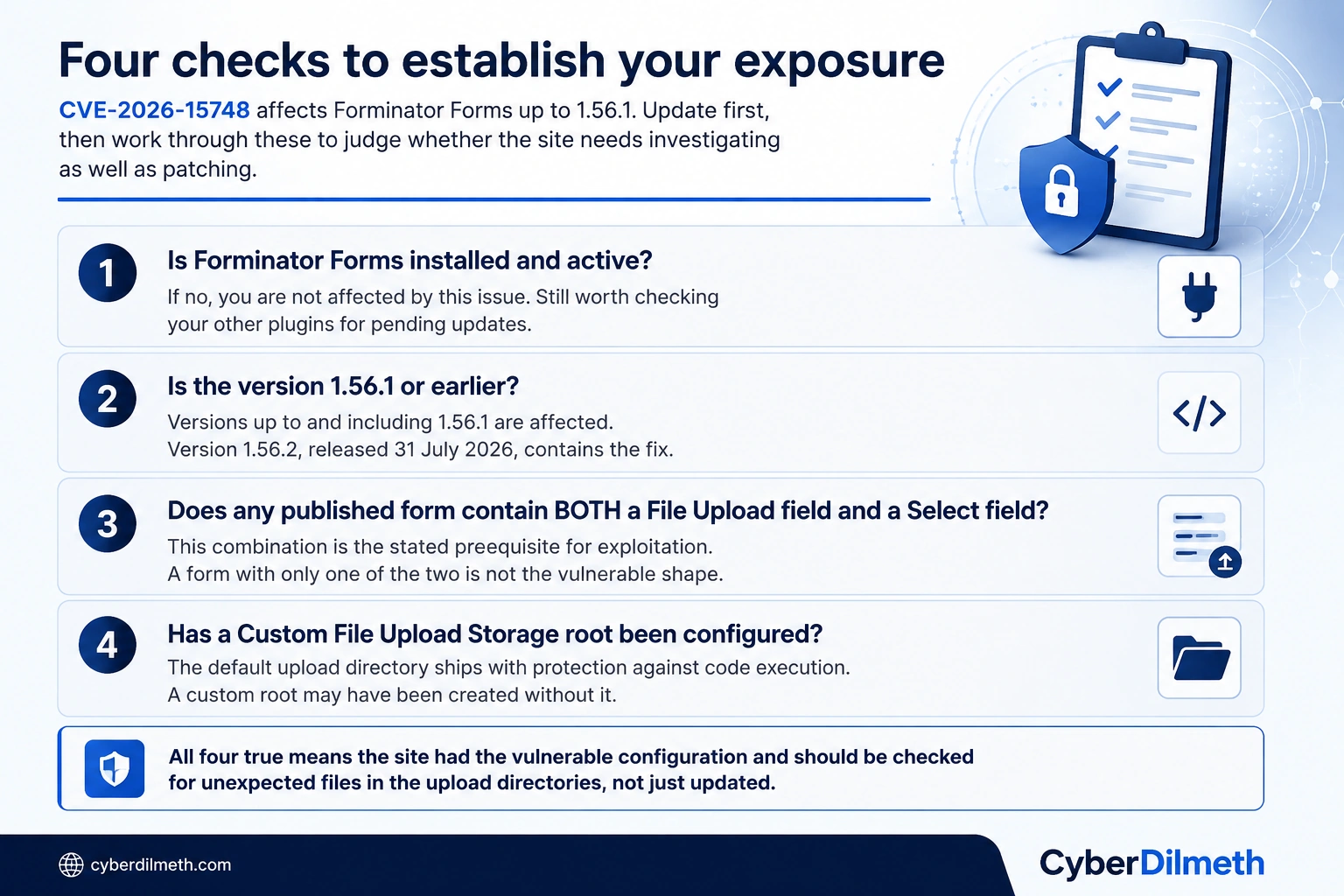
Exploitation has a specific prerequisite: the site must have a published form containing both a File Upload field and a Select field. That narrows the population considerably, and it is the first thing to check after updating.
According to SecurityWeek’s reading of WordPress installation data, around half of the plugin’s user base was running a vulnerable version at disclosure, putting the potentially exposed population in the region of 300,000 sites. No in-the-wild exploitation had been reported at that point. That is a description of the situation at disclosure rather than a guarantee about the present, and unauthenticated flaws in widely installed plugins are exactly the kind that automated scanning finds quickly once details are public.
Wordfence separately disclosed an authentication bypass in User Profile Builder, a smaller plugin with around 40,000 installations, tracked as CVE-2026-15826 and patched in version 3.16.5 on 16 July. It is only exploitable where the plugin’s automatic login setting is enabled. The two issues are unrelated beyond timing, but they have been reported together often enough that it is worth keeping the CVE identifiers straight.
Why it matters
If you run a WordPress site, this is a five-minute job that is worth doing today: check whether Forminator is installed, and if it is, update it. There is nothing to be alarmed about here, and no personal data of yours has been exposed by this flaw. The broader habit is the useful part. Plugins are the most common route into WordPress sites, and the gap between a patch being released and being applied is where nearly all the risk lives. Turning on automatic updates for plugins, or setting a recurring reminder to check, removes most of this category of problem without any security expertise.
For organisations, the specific lesson is about configuration drift rather than patching speed. The default installation was protected. The dangerous state arose from an administrator using a legitimate feature, a custom upload directory, in a way that quietly lost a protection the default provided. That pattern generalises well beyond this plugin: security properties that depend on a default being left alone will erode as people configure things for good operational reasons, and nobody receives a notification when they do. It is worth asking which of your own protections are properties of a default rather than of an enforced control. The other question this raises is inventory. Answering “do we run Forminator anywhere” should take minutes across every site you are responsible for, including the ones inherited from a marketing agency or built for a campaign three years ago and never decommissioned.
For practitioners, the interesting detail is the bypass mechanism. The extension blocklist failed because it used exact-key matching against MIME type keys, and pipe-alternative formulations did not match. This is the recurring argument for allowlisting over blocklisting in upload validation: a blocklist has to anticipate every representation of a dangerous type, while an allowlist only has to enumerate what is permitted. Worth checking your own upload paths for the same shape, particularly anywhere validation happens on a client-supplied content type rather than on the file itself. On the response side, patching closes the hole but does not answer whether anything came through it. If a site had the vulnerable form shape and a custom upload root, review the upload directories for unexpected files, check web server access logs for direct requests to files in those paths, and confirm no unfamiliar administrative accounts or scheduled tasks exist.
What to do now
- Update Forminator Forms to version 1.56.2 or later on every site you run.
- Check whether any published form combines a File Upload field with a Select field.
- Check whether a Custom File Upload Storage root has been configured, and confirm the directory carries protection against code execution.
- If both of the above were true before patching, review the upload directories for unexpected files and check access logs for direct requests to them.
- Confirm no unfamiliar administrator accounts or scheduled tasks have appeared.
- Enable automatic updates for plugins where your change process allows it, and check that your site inventory is complete enough to answer this kind of question quickly next time.
Last verified: 20 August 2026. No in-the-wild exploitation had been reported at the time of disclosure; this may have changed since.