

- “Endpoint” is industry shorthand for a device someone actually uses: a phone, a laptop, a tablet, a desktop.
- Attacks on personal devices now mostly aim to quietly copy what is already signed in, not to break anything you would notice.
- Most of the protection you need is already built into your device and switched on. The job is to check it, not to buy more of it.
- Automatic updates, a screen lock and installing only from official app stores remove a large share of the risk for a few minutes of effort.
- A device that no longer receives security updates cannot be made safe by adding software to it.
Security writing is full of the word “endpoint”, and it does a poor job of explaining itself. It means a device that a person sits in front of or carries around: the laptop on your desk, the phone in your pocket, the tablet the family shares. Endpoint security is simply the set of habits and settings that keep those devices from becoming somebody else’s way in. This is a beginner’s version. It assumes you own two or three devices, not two thousand, and it is deliberately short on products.
Why your device is a target at all
The useful thing to understand first is that the goal has changed. The stereotype of malware is a program that breaks your computer, fills the screen with warnings or holds your files to ransom. That still happens. But a great deal of what now reaches ordinary devices is designed to do the opposite of announcing itself. It copies things and leaves, because the valuable part of your device is not the hardware and not even most of the files. It is the fact that your device is already logged in to everything.
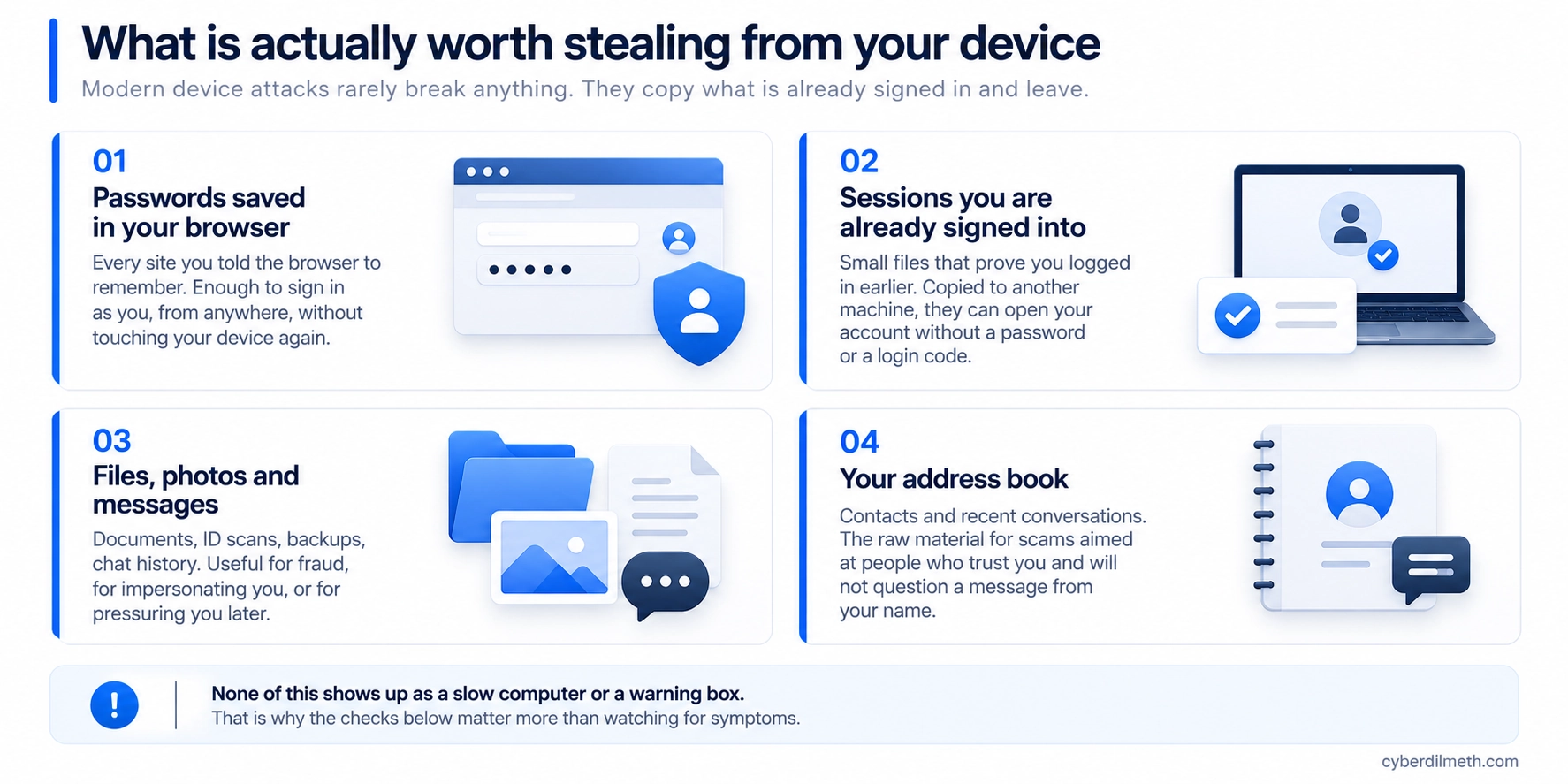
Two items on that list deserve a moment. The first is the passwords your browser has offered to remember over the years, which for most people is a fuller list than they would guess. The second is subtler. When you sign in to a service, it hands your browser a small file proving you already did so, which is why you are not asked to log in again every morning. If that file is copied to somebody else’s machine, it can be presented as evidence that the login already happened. That is the mechanism behind the session hijacking we covered in the Microsoft 365 phishing campaign, and it is why “I have two-factor turned on” is a good answer but not a complete one.
None of this produces symptoms. Nobody notices their laptop running slightly warmer because a file was copied. Waiting to feel that something is wrong is not a defence, which is why the rest of this article is about settings rather than vigilance.
You probably own most of the protection already
This is the part the market has an interest in you not knowing. Antivirus and firewall software are built into modern computers and switched on by default, and the UK’s National Cyber Security Centre tells small organisations to check that both are still on rather than to go shopping, the concern being a previous owner or a well-meaning relative having turned them off. Apple devices ship with virus protection already running. For phones and tablets, the same guidance is blunter: additional antivirus is generally unnecessary as long as you install apps from a widely trusted store such as the App Store or Google Play.
That is not an argument that paid security software is worthless, and organisations managing fleets of machines have needs an individual does not. It is an argument that the free protection sitting unexamined on your device is worth more than the paid protection you have not bought, and that “which antivirus should I get” is usually the wrong first question.
Five things that are actually worth your time
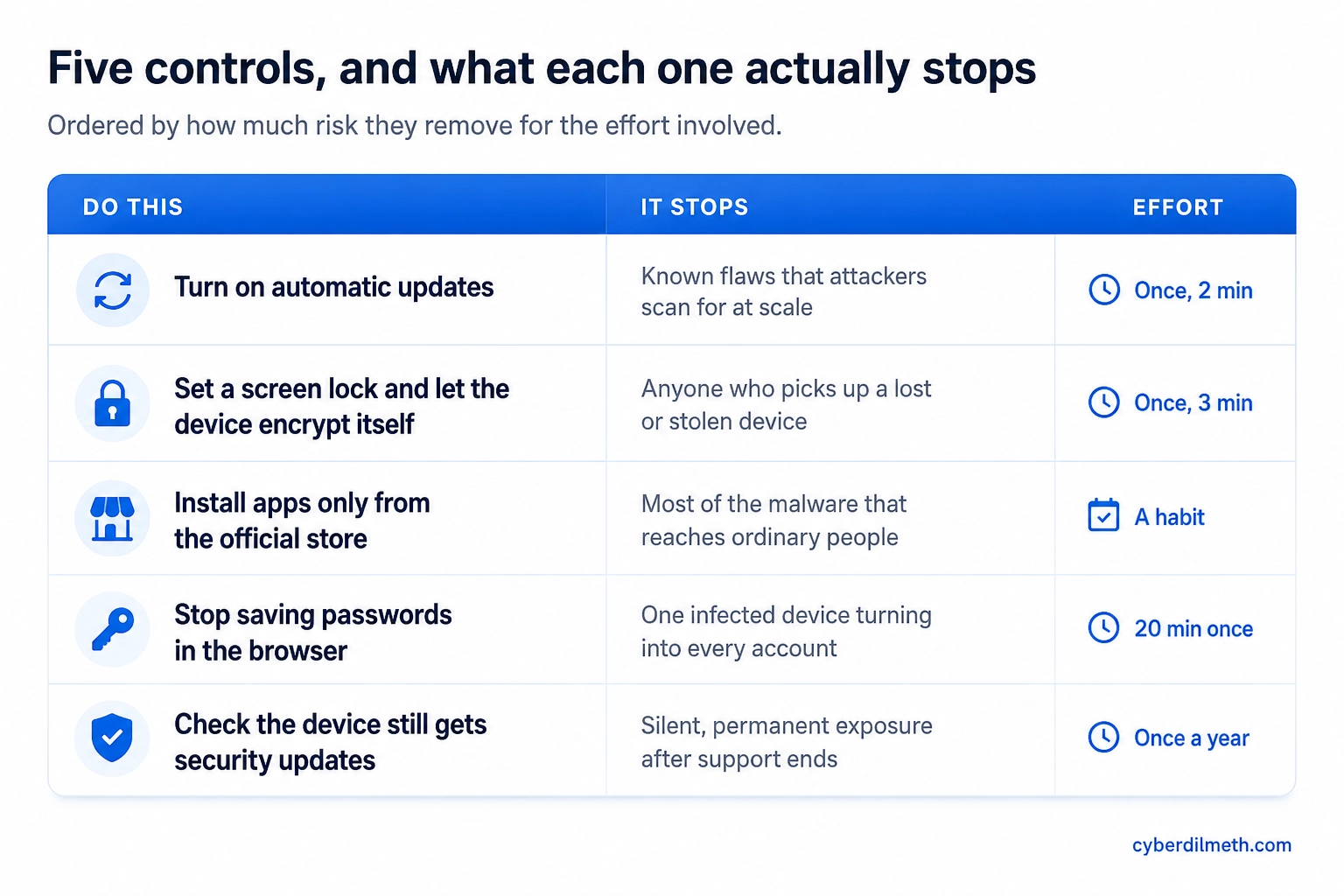
Turn on automatic updates, everywhere. Attackers do not usually pick you. They scan the internet for devices still carrying a flaw that was fixed months ago, because that is cheap and it works. Updates close those flaws, and the US Cybersecurity and Infrastructure Security Agency recommends enabling automatic updates precisely so the decision stops depending on you remembering. Do it for the operating system, the browser and the apps. Apps installed from a store usually update themselves; anything installed from a website often will not.
Set a screen lock and let the device encrypt itself. A PIN, passcode or biometric lock is what stands between a lost phone and everything described in the diagram above. On current phones and laptops, setting a lock is also what switches on the encryption of the storage, so the two are one decision rather than two.
Install from the official store, and delete what you stopped using. The most common way malware reaches an ordinary person is an install they performed themselves, from a search result, an advert or a download site offering a paid application for free. Official stores are not perfect, but they are a filter. The second half matters too: the NCSC advises deleting apps you no longer use, since an abandoned app that stops receiving updates is a flaw you are still carrying.
Stop letting the browser hold your passwords. This is the one change that limits the damage when something does get through, because it breaks the link between one compromised device and every account you own. A password manager keeps the list behind a separate lock instead of inside the browser profile. If you want to check how weak your current habits are before you switch, our Password Studio runs entirely in your browser and sends nothing to us.
Find out when your device stops receiving security updates. Every phone, laptop and operating system has an end-of-support date after which flaws found in it are simply never fixed. Manufacturers publish these, and they are worth looking up once a year for each device you own. This is also the one problem on the list that no product solves.
Security software installed on an unsupported device does not restore its support. Once the manufacturer stops issuing fixes, newly discovered flaws in that device stay open permanently. If replacing it is not realistic yet, at least stop using it for banking, email and anything holding identity documents.
If you think a device has been compromised
The instinct is to change your passwords on the device in front of you. Do it from a different device instead, because if the first one is still compromised you are simply typing new passwords into the same problem. Then, in each important account’s security settings, look for the option to sign out of all sessions or all devices. This step is the one people skip, and it is the one that matters most, because changing a password does not by itself invalidate a session file somebody already copied.
- Open the update settings on your phone and your computer and confirm automatic updates are on for both the system and its apps.
- Check that the built-in antivirus and firewall on your computer are switched on. If a previous owner disabled them, turn them back on.
- Set a screen lock on every device that does not have one, including the tablet nobody claims.
- Look up each device model and its operating system version alongside the phrase “end of support” and note the dates somewhere you will see them again.
- Move your saved browser passwords into a password manager, then clear them out of the browser.
The honest limit of all this
These five controls are not a guarantee, and anyone offering you one is selling something. What they do is remove the routes that are cheap to attack at scale, which is the overwhelming majority of what a person or a small business will ever face. Targeted attention from a well-resourced attacker is a different problem with different answers. For almost everyone reading this, the gap between doing nothing and doing the five things above is far larger than the gap between doing them and buying anything else.
Guidance in this article was verified against the cited NCSC and CISA sources on 16-Aug-2026. Vendor support dates change and should be checked against the manufacturer directly.