

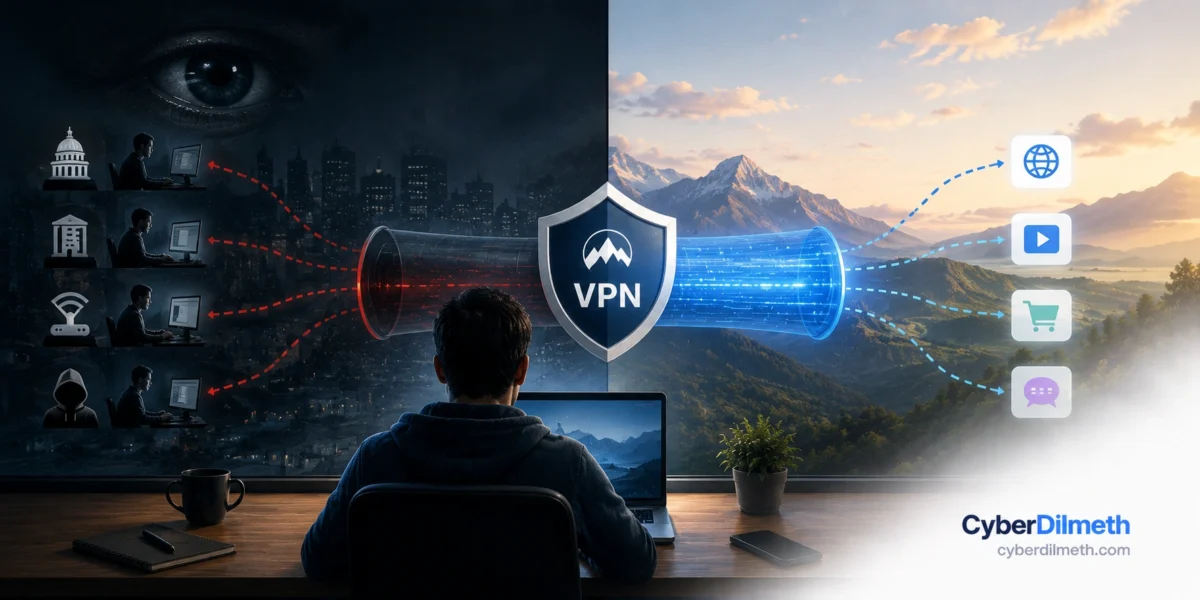
- A VPN does not make you invisible. It moves who is able to watch your browsing from your internet provider to a VPN company.
- The classic reason to buy one, protecting yourself on cafe Wi-Fi, has largely been solved by your browser. Almost all web traffic is now encrypted by default.
- Google is making Chrome ask permission before loading any site that is not encrypted, with the change reaching everyone in October 2026.
- There are still good reasons to use a VPN. Anonymity, virus protection and phishing protection are not among them.
- Almost every “best VPN” article you will find online earns commission on the link you click. That is worth knowing before you read one.
- A work VPN and a consumer VPN share a name and almost nothing else.
Few security products are marketed as heavily as the VPN, and few are so widely misunderstood. The advertising tends to suggest a cloak of invisibility. What you are actually buying is a redirection service, and whether that is worth paying for depends entirely on what you were hoping it would do.
What a VPN actually does
Normally your device connects to a website through whoever provides your internet: your home broadband company, your mobile network, or the cafe’s router. That provider can see which sites you connect to.
A VPN puts a detour in the middle. Your device makes an encrypted connection to a server run by the VPN company, and that server connects onward to the website on your behalf. Your internet provider now sees only that you are talking to the VPN. The website sees the VPN’s location rather than yours.
Read that carefully, because the important part is easy to miss. Your browsing did not become unwatchable. It became watchable by a different company.
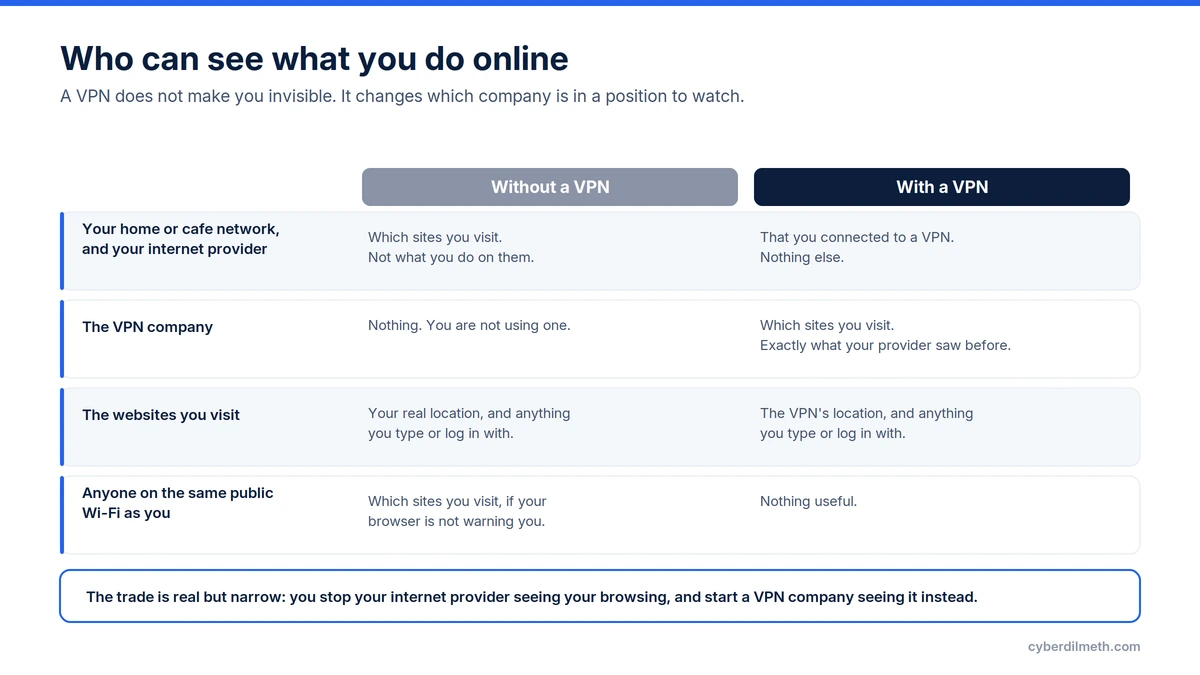
That trade can be entirely reasonable. If you would rather a company you chose and pay for could see your browsing than one you were assigned by geography, a VPN delivers exactly that. It is a real benefit, and it is much narrower than the advertising suggests.
The cafe Wi-Fi argument has quietly expired
For a decade the standard pitch was that someone on the same public network could read everything you did. That was a fair concern once. It mostly is not now, because the web moved to encryption.
When you see a website address beginning with “https”, the connection between your device and that site is already encrypted. Someone watching the network can see that you connected to a particular site, but not what you read, typed or logged in with. Google, which measures this across Chrome, reports that the share of browsing using encrypted connections climbed from roughly 30 to 45 percent in 2015 to around 95 to 99 percent by 2020.
Browsers are now closing the remaining gap themselves. In the same announcement, Google said that from Chrome 154 in October 2026 it will turn on a setting called “Always Use Secure Connections” for everyone, so the browser tries an encrypted connection first and asks your permission before loading a site that has none. When Google trialled this, users saw a warning on fewer than three percent of the pages they visited.
If you use a modern browser and you do not click through security warnings, public Wi-Fi is no longer the open window it was in 2015. The protection you were told to buy a VPN for is already switched on and free.
So should you get one?
It depends what you want it for, and the honest answers vary a lot.
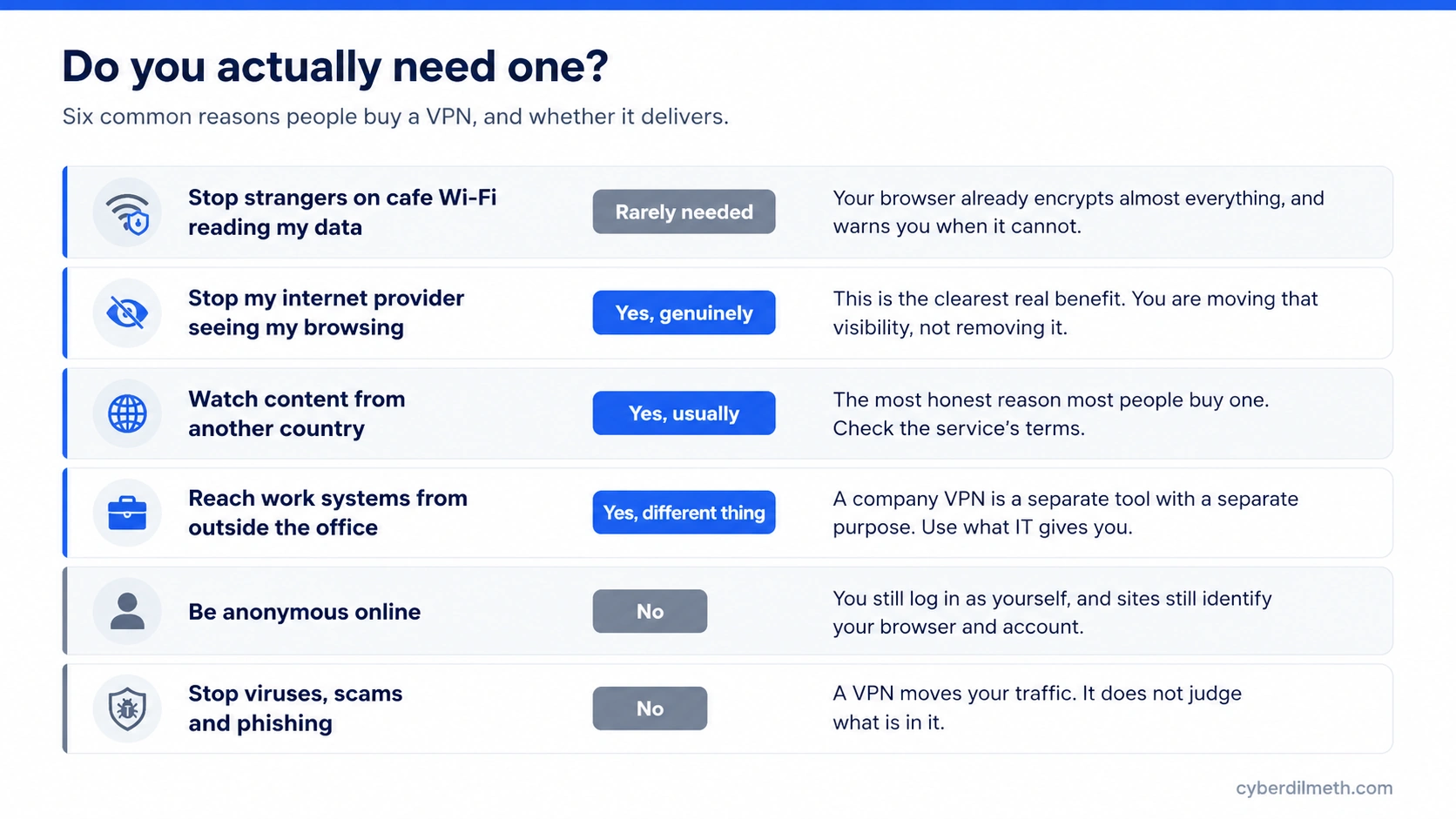
The clearest genuine use is keeping your browsing away from your internet provider. In many countries that provider is legally required to keep records of the sites you visit, and may be permitted to use that information commercially. If that bothers you, a VPN addresses it directly, provided you trust the VPN company more than the provider.
The second is watching content licensed to another country, which is what a great many people quietly buy one for. It usually works and it is usually against the streaming service’s terms, which is a decision for you rather than a security question.
The third is not really a consumer product at all. A work VPN exists so employees can reach internal company systems from outside the office. It is issued by an employer, configured by them, and unrelated to the subscription services advertised online.
What a VPN will not do
It will not make you anonymous. The moment you sign in to an email account, a shop or a social network, you have identified yourself regardless of where your connection appears to come from. Websites also recognise returning visitors through your browser settings and stored data, none of which a VPN changes.
It will not protect you from viruses or scams. A VPN carries your traffic somewhere else without inspecting it. A malicious download arrives just as reliably through a VPN as without one.
It will not stop phishing, and this is the gap worth understanding. The attacks that actually take over accounts now do it by getting you to sign in on a page the attacker controls, which passes your details straight through to the real service. We covered an active campaign doing this against business accounts. Everything about it works identically whether or not you are using a VPN, because you volunteered the information.
It also will not hide your activity from a website you are logged into, from an employer’s own device monitoring, or from anyone with access to your device itself.
Choosing one, and why the reviews are difficult
If you have decided you want one, there is something you should know before you start reading comparisons. VPN subscriptions pay generous commission to whoever refers a sale, and much of the “best VPN” content online is written to earn it. Rankings frequently shift with commission rates rather than with product quality. This is not a claim about any particular publication; it is the ordinary economics of the category, and it explains why straight answers are unusually hard to find.
We are not going to recommend a provider here, because doing that well needs testing we have not done and we will not take money to pretend otherwise. What is reasonable to offer is what to look for:
Who owns it, and can you find out. The industry has consolidated, and several familiar brands share parent companies. If ownership is hard to establish, that is itself information about a service whose entire value is trust.
Whether an independent firm has checked the no-logging claim. Every provider claims to keep no records. An audit by a named firm, with a date and a published report, is meaningfully better evidence than the claim alone. It is still a snapshot of one moment rather than a guarantee about the future.
Whether you are paying. Running a global server network costs real money. A free VPN is funding that somehow, and the usual answer is your data. Free tiers from providers with a paid business are a different proposition from free-only apps.
What jurisdiction it operates under, since that determines who can compel it to hand over records and what it is required to keep.
- Write down what you actually want a VPN for, in one sentence, before looking at any product. If the sentence is about anonymity or viruses, you want something else.
- Check your browser is up to date, which is the single change that does most for public Wi-Fi safety, and costs nothing.
- If a browser warns you a site is not secure, do not click through it. That warning is the protection working.
- If you use one for work, use the one your employer provides rather than a personal subscription.
- If you decide to buy, look up who owns the company and whether the no-logging claim has been independently checked and published.
- Avoid free VPN apps unless they are the free tier of a provider with a real paid business.
- Treat any article ranking VPNs as advertising until you can establish otherwise.
The short version
A VPN is a useful, narrow tool that has been sold as a broad one. It genuinely changes who can see your browsing and where you appear to be, and those are worth paying for if you want them. It does not make you anonymous, does not protect you from the attacks most likely to affect you, and no longer does much for the coffee shop problem that made it famous.
Deciding what you want first turns an intimidating purchase into a simple one. Quite often the answer is that you do not need one, and that is a perfectly good outcome.
Last verified: 7 August 2026. Browser behaviour and provider ownership change over time, and the Chrome default described here is scheduled rather than shipped at the time of writing.