


Attackers have been taking administrative control of the Wi-Fi gateways that hotels and conference centres use to run their guest networks, then quietly rewriting DNS so that travelling employees who try to reach Microsoft 365 land on a page the attacker controls instead. The activity was documented by ReliaQuest Threat Research and has been running since at least June 2026, with compromised gateways found across several US cities as well as in India and Saudi Arabia. No phishing email is sent and nothing is installed on the victim’s laptop. The tradecraft closely resembles Russian state-linked router campaigns, though researchers stopped short of attributing it.
What happened
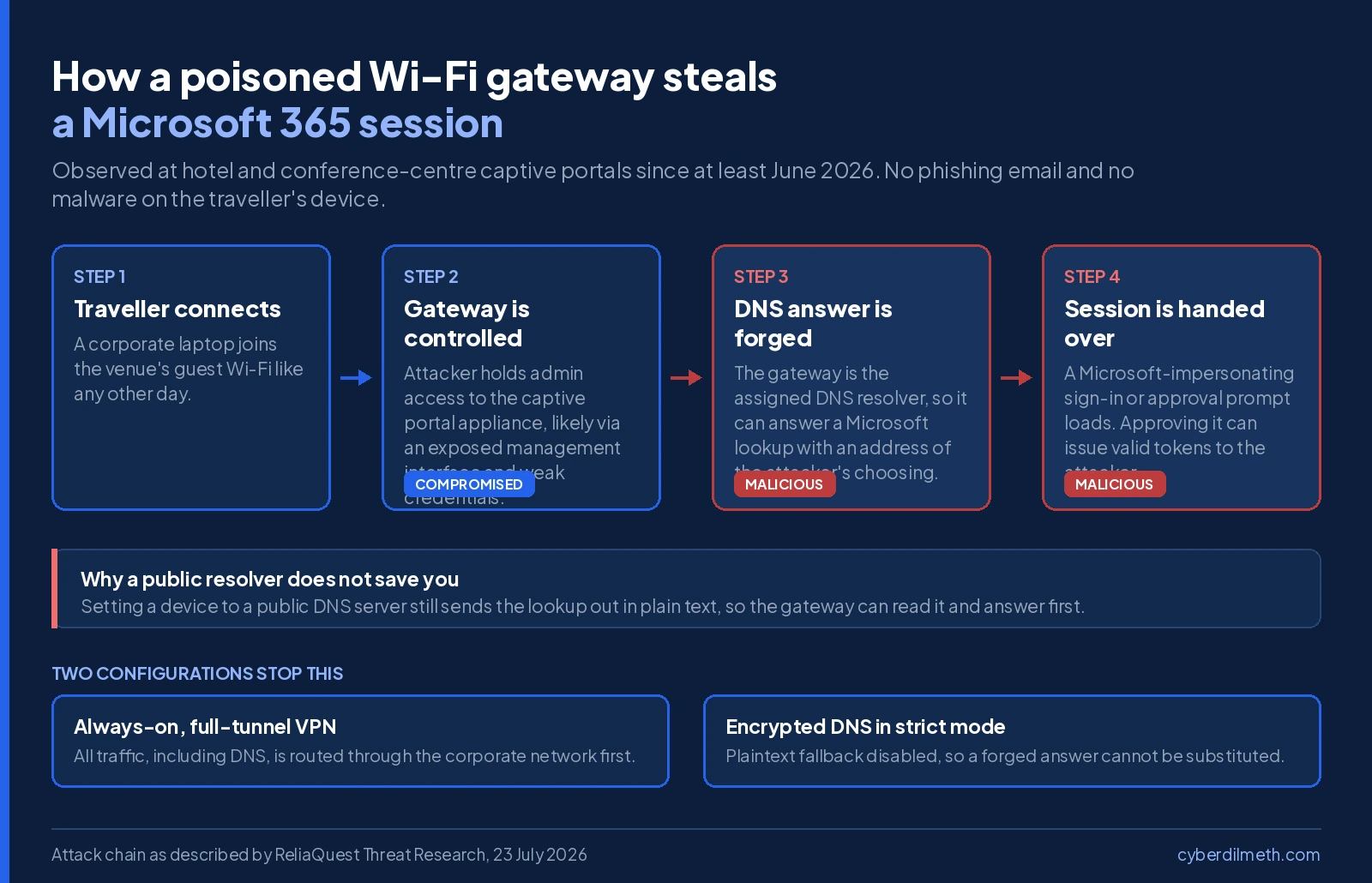
A captive portal gateway is the appliance behind the sign-in screen you see when you join hotel Wi-Fi and type a room number or accept the terms. It sits at the edge of the guest network and, critically, it hands out DNS settings to every device that connects. Whoever controls that appliance controls where every guest’s traffic goes.
ReliaQuest assesses with low-to-medium confidence that the attackers got in through management interfaces left exposed to the internet, such as SSH, SNMP and web administration consoles, combined with weak or reused administrator passwords. Once inside, they changed the device’s configuration so that lookups for Microsoft sign-in domains resolved to their own servers. Four attacker-registered domains were used to serve Microsoft-impersonating pages.
The venues were mostly hotels, but the researchers were clear that the exposure is structural rather than sector-specific. Airports, conference centres, co-working spaces, universities, healthcare facilities and event venues all run the same class of appliance. Traffic reaching the compromised gateways came from organisations in financial services, professional services, legal, healthcare, energy and retail, which points at travelling employees as the target rather than any one industry.
Why the usual protections do not help
The uncomfortable part of this research is how many familiar defences sit this one out. Endpoint protection and detection tools see nothing, because nothing malicious runs on the laptop. Email filtering sees nothing, because no message is sent. And pointing a device at a well-known public DNS server does not help either: the query still leaves the machine unencrypted, which means the gateway can read it and answer first.
Encrypted DNS only closes the gap if it is set to strict mode, where plaintext fallback is switched off. Most tools default to opportunistic mode, which quietly falls back to an ordinary lookup when encrypted resolution fails, and that fallback is precisely what the gateway intercepts. The single control ReliaQuest highlights as effective is an always-on VPN in full-tunnel configuration, which sends every request, DNS included, through the corporate network before the venue’s gateway ever sees it.
Two twists worth knowing about
In roughly a third of the cases observed, the attackers also went after Web Proxy Auto-Discovery, a Windows feature enabled by default that looks for proxy settings when a device joins a network. A gateway operator controls both places Windows checks. Where it succeeds, the result is far broader than stolen credentials, because most application traffic can be routed through the attacker’s proxy and the resulting logs look like routine encrypted connections.
In a smaller number of cases, the redirect was paired with abuse of Microsoft’s device-code authentication flow. Here the victim is not asked to type a password at all. They are shown what looks like a legitimate approval prompt, and approving it authorises a session the attacker started, which hands over valid tokens without any credential ever being intercepted. This is the detail that should give pause to anyone treating multi-factor authentication as the finish line, because the flow produces access that has already satisfied MFA. Neither technique appeared in earlier reporting on the related router campaign, and one of the attacker domains was still showing active operator infrastructure as recently as 23 July, which suggests the campaign has not wound down.
Why it matters
If you travel for work, this changes what “be careful on public Wi-Fi” actually means. The old advice assumed you would notice something: a dodgy link, an unexpected attachment, a warning from your antivirus. Here there is nothing to notice. You join the network you have joined a dozen times before, a Microsoft sign-in page appears, and it looks right because your browser genuinely went where DNS told it to go. The one habit that still works is slowing down at the moment of sign-in and checking the address bar and certificate before typing anything, particularly on a network you do not own.
For organisations, the decision this forces is about travel posture rather than incident response. A compromised hotel gateway is not your breach to remediate, and you have no way to patch it, so the only lever you hold is what your devices do when they connect to an untrusted network. That makes always-on full-tunnel VPN a policy question with a real cost attached, since split-tunnelling exceptions are usually there because someone wanted better video-call quality or faster file transfers. Those exceptions are the gap. It is also worth asking whether the device-code flow is enabled in your identity platform at all, because for most users in most environments it has few legitimate uses and blocking it removes the path this campaign depends on.
For defenders, the useful signals are at the network and identity layers rather than the endpoint. DNS responses resolving Microsoft authentication domains to addresses outside expected ranges, proxy authentication appearing from unrecognised hosts, and device-code grants from unfamiliar clients are each unremarkable alone and meaningful together. Disabling Web Proxy Auto-Discovery through Group Policy where it is not needed removes an entire branch of this chain at effectively no cost, and reviewing enrolled devices in your tenant matters because attacker-registered devices survive both password resets and session revocation.
- Travelling this week? Turn on your corporate VPN before you open anything else, and check the address bar carefully on any sign-in page that appears on hotel or venue Wi-Fi.
- Approve nothing you did not start. If a Microsoft approval or code prompt appears without you having asked to sign in, dismiss it and report it. That prompt is the attack, not a glitch.
- Enforce always-on, full-tunnel VPN on corporate devices, and audit split-tunnelling exceptions that would let DNS or authentication traffic bypass it.
- Block the device-code flow with a Conditional Access policy unless you have a documented use case for it.
- Disable Web Proxy Auto-Discovery via Group Policy where automatic proxy discovery is not required, or restrict configuration file retrieval to approved internal hosts.
- If you run guest Wi-Fi yourself, take the gateway’s management interfaces off the public internet and replace any default or reused administrator credentials.
Multi-factor authentication does not close this on its own. Where the device-code flow is abused, the attacker receives tokens that have already satisfied MFA, so a successful sign-in in your logs is not by itself evidence that nothing went wrong.